
Dev Team’s BootNeuter fixes Bootloader without pwnage – Windows / Mac Guide
With the release of PWNAGE, we now have BootNeuter to get any Bootloader to work with the future releases of iPhone firmwares! If you have a 3.8 BL (restoring to 1.0.2 / 1.1.1 using iPlus) you can now use BootNeuter to get back to 3.9 / 4.6 BL and fakeblank it which means no more restrictions with bootloaders! You can do it all from the comfort of your iPhone as shown 🙂
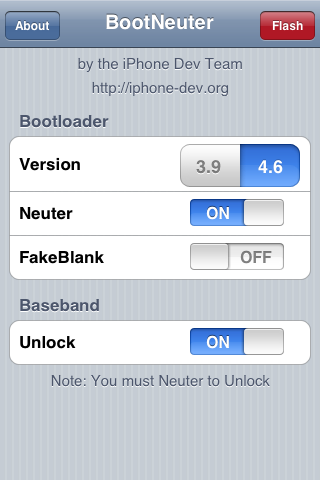
Well, since Zibri forced all ZiPhone users to 3.9 BL voiding their warranties (since we can’t get 4.6BL back!), BootNeuter comes to the rescue yet again…. the image better describes it all 🙂 So, rock and roll with pawnage, wait for ipsw tool to build your own firmwares and then start the party atleast till the official release of iPhone 2.0 firmware! It should sustain the unlock and jailbreak out of the box 🙂 More on this here … All props to the Dev team 🙂 Donate and keep the iPhone hackery alive!
Just download this file for 1.1.4.
Extract the BootNeuter.app and SSH it to your iPhone using FUGU (Mac) or WinSCP (Windows).
Then set the suid bit for root and change the owner to root using the following commands via SSH :
chmod u+s /Applications/BootNeuter.app/BootNeuter

chown root:wheel /Applications/BootNeuter.app/BootNeuter
Steps to follow : (Continued)
Settings -> General -> Auto-Lock -> Never (To ensure a hassle-free WiFi FTP!).
Then note down the IP address from Settings -> WiFi

SSH BootNeuter.app to your iPhone using FUGU (Mac) or WinSCP (Windows). (User : root, Port : 22, password : alpine).

Launch Terminal (Mac) or Command Prompt (Windows) and enter the commands as shown :
password : alpine
copy the following for the last 2 commands and paste in the Terminal:
chmod u+s /Applications/BootNeuter.app/BootNeuter

chown root:wheel /Applications/BootNeuter.app/BootNeuter

Restart the SpringBoard and now you have a fully functional BootNeuter.app!


Hi
New to all this.. I have an iphone 3g wanting to work on Orange UK.. Will this unlock the iphone for me to use my Orange sim in it??
Please help…
What is your firmware version?
2.1…. very quick reply.
thank you
p.s i have tried 4 different types of turbo sims which worked untill i updated to 2.2 but apple replaced after complaining it wasnt working correctly…
What is the baseband version? Found in settings general about modem firmware
Sent from my iPhone
02.11.07
Cool! You should be able to unlock it soon! Quickpwn for now…
Sent from my iPhone
so i can use Quickpwn to unlock and use Orange UK sim instead of O2 UK??
How?
Will i be able to use the yellowsn0w app on new years eve??
Yep you are all set! Not to worry!
Sent from my iPhone
lol thanks but how???
it wont kill it will it??
Not at all! You have the right baseband, nothing can go wrong…
Sent from my iPhone
ok… so how do i unlock it?
do i have to wait til 31.12.08???
or can i do it now?
sorry about all this, i just have no idea…
We have to wait till it's released…
Sent from my iPhone
so its on the 31.12.08 then???
Yep December 31 it is…
Sent from my iPhone
Hello all,
Thanks for all the valuable info. Got everything finally working after my 2.2 upgrade and sorted out the no signal issue with the bootneuter . I have the 2g iphone …. But now I have no sound or no ipod…… I have a vibration when i get a call but no ringtone, and no sound with my ipod. Any Suggestions? I cant figure it out at all! Any help would be greatly appreciated
Sound should be enabled in iPod no matter what. I would suggest flashing a stock firmware and try.
Sent from my iPhone
[…] Boot Neuter Howtohttp://ilikemyiphone.com/wordpress/?p=252 […]
guys i would be needing help later, lemmi resolve the problem by these posts, infact i upgraded my iphone 2.2 3G to version 3.0.1, and it gives me no sim probem (insert no sim pin or tap to insert pin) some thing like that, lets see what happens.. hope you guys gonna help me if i couldnt make it
Nauman
im trying dev team method to repaire my wifi on my iphone 3g 4.2.1 but bootnuetre dosn't work evin after i tape :chmod u+s /Applications/BootNeuter.app/BootNeuter
Puis
chown root:wheel /Applications/BootNeuter.app/BootNeuter
Puis
chmod -R 755 /Applications/BootNeuter.app
))on terminal vt 100
give me a solution please
I’m not sure why but this blog is loading very slow for
me. Is anyone else having this problem or is it a issue on my end?
I’ll check back later and see if the problem still exists.
A fascinating discussion is definitely worth comment.
I believe that you ought to write more on this topic, it might not be a taboo subject but
typically people don’t talk about these issues.
To the next! Kind regards!!
This is the second blog post, of urs I browsed. Nevertheless I love this particular 1, “Dev Team
The Sims four is the hugely predicted daily life simulation sport that lets you play with daily life like never ever prior to.
Generate new Sims with intelligence and emotion, whose each and every motion is informed and influenced
by their interactions and emotional states.
Expertise all new intuitive and exciting inventive tools.
Sculpt your Sims in Create A Sim and build exclusive residences with the tactile space-primarily based Create Mode.
Handle the thoughts, physique, and coronary heart
of your Sims with dynamic, emotion-wealthy gameplay, and carry your tales to life.
Very good article! We are linking to this great content
on our site. Keep up the great writing.
Today, I went to the beach with my kids. I found a sea shell and
gave it to my 4 year old daughter and said “You can hear the ocean if you put this to your ear.” She placed the shell to
her ear and screamed. There was a hermit crab inside
and it pinched her ear. She never wants to go back! LoL I know this is
totally off topic but I had to tell someone!
When I originally commented I seem to have clicked on the
-Notify me when new comments are added- checkbox and now every time a comment is added I receive
4 emails with the same comment. There has to be an easy method
you are able to remove me from that service? Cheers!
Leave your response!
You must be logged in to post a comment.
Categories
Recent Posts
Recent Comments
Popular Tags
Blogroll
Meta
Recently Posted
Most Viewed
Most Discussed