Aviegas fixed the major errors plaguing this wonderful tool – iPlus 2.0 b, the best tool for unlocking your 1.1.4 iPhone. Yeah, it works only with 1.1.4 firmware and you can know more about the app itself here. After all the hush-hush on hackint0$h about this app, the author released this version carefully sealing not so buggy bugs!
Safest Unlock for iPhone – Using iPlus from Kiran Konathala on Vimeo.
The highlights of this release being :
– Unlock/downgrade strategy rework: Now safer than ever!
– Fix for the “Repair Needed” problem
– iPlus will always reboot twice (and not 2 or 3 times)
– Pass 2 visual feedback. Now users know what is going on
– PC/Mac program will not end until everything is really done
– Support for PPC
– No need to install libreadline on MacOS X
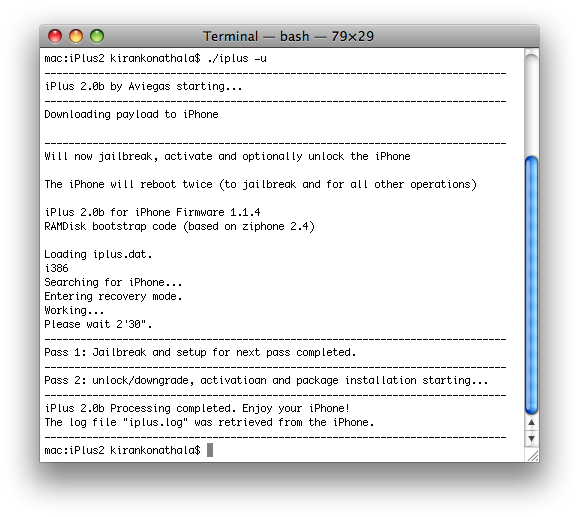
So, all you have to do is launch the terminal and perform the following operations :
Quick Guide :
- Restore your iPhone to 1.1.4 in iTunes (from any firmware)
- Determine your firmware using *3001#12345#* and restore to 1.1.4. It never hurts restoring to 1.1.4 though!
- If it is a brand new iPhone, restore to 1.1.4 and then connect your iPhone to iTunes atleast once
- Quit iTunes and iTunesHelper (Activity Monitor)
- Download iPlus 2.0b, Unpack , open “Terminal” and cd to the directory where iPlus is extracted to and type: ./iplus -u (it jailbreaks, unlocks and activates your iPhone).

You need not install the libreadline for Mac OS X anymore, hence hassle free! Ignore the “Could not enable SSL” error message, it is a friendly error! Those all waiting for the safest unlock/jailbreak ever, time has come! This can also be used for installing installer.app with some necessary applications pre-installed! It can’t get any better!!
I recorded the entire process but SnapzPro errored out at the end 🙁 Anyways, my observations : I used the default payload and I didn’t even quit iTunes or iTuneshelper!! Everything worked straight out of the box! Amazingly simple, ZiPhone may be tossed now! Will test the same on a PC and let you know guys!
Update : Possible Youtube fix from Larry..
Sync iPhone to be sure you have good backup of data
Take SIM out of phone
Put iPhone into Restore mode and restore firmware using iTunes
When restore is complete, Close iTunes and Quit iTuneshelper and iTunes in ActivityMonitor
Leave SIM out of iPhone and unlock iPhone with iPlus following the procedure
When iPlus is complete, re-install SIM
iPhone is completely unlocked and all applications (including YouTube) function perfectly.
So, if I restore then update my 1.1.3 iPhone to 1.1.4, I will be able to use iPlus to jailbreak/unlock and be able to use my Rogers SIM car in it?
i’ve jail break with iplus the problem now i face is that my youtue isn’t working thru edge… please help
does this work for iPod touches?
after running this iplus 2.0b my voicemail icon will not work. it use to work using the ziphone method
Hey Alex, I used it without an issue on different OTB iPhones and it worked without a hitch. Did you restore to 1.1.4 before using iPlus?? You might also want to “reset all settings” on the iPhone …
I did a 1.1.4 restore before using iPlus. I am also running a 38BL. and I did just try your suggestion “reset all settings” still no go. voicemail will no dial when I press the icon. It use to work when I used the ziphone method
3.8 Bootloader or 3.9?
3.9 BL. I gave up on iplus and went back to ziphone.
What a fabulous site – you manage to trash Ziphone, which works fine and does not downgrade your baseband – just sych with iTunes and all is well – and when you all come to making your big sell, your link to downloading iPlus is busted.
If you can’t even manage a link to the download of the “safest jailbreak” available, why would I trust you with the guts of my iPhone?
Charles : You are free to choose the method you feel is the best. Check the link again, repaired it, thanks for pointing it out! Trust me, it works 😉
Well, http://www.hackint0sh.org/forum/showthread.php?t=…will be the way to go since I see youtube issues in this forum all the time but never faced it personally … Well, all th iPhones I tied iPlus on were never touched with ZiPhone, hmmm… not sure 🙁
I found the program to work very well. The only hickup I have is that YouTube gives me a “Cannot connect to YouTube” message. I saw the YouTube patch being applied to the phone during the unlock. Has anyone else had htis happen? Is there a fix for this?
Thanks
The youtube issue has been plaguing iPlus users for some time now. I have been using iTunes 7.6 and iPlus 2.0b on intel Mac with 100% success. Post your specs, will try to suggest…
Thanks kiran: Here you go:
MacBook Pro 17 – 2.4G, 2GB ram
iTunes 7.6.1 (9)
iPhone 16GB, Version 1.1.4(4A102), Model-MB384LL, Modem Firmware-04.04.05_G
iPlus2.0b
Thanks for any assistance you can offer:)
kiran, one correction:
MacBook Pro 17 running Leopard, 2.4 Ghz Intel Core 2 Duo, 4GB memory
Ooow, exact same specs like mine (Macbook, 2GB, Leopard though). Restore is the key, did you restore to 1.1.4 before you initiated the process?
Yes, kiran.
I had previously used ZiPhone and was unhappy with the results. I reset the phone and reloaded using recovery mode.
I used the instructions for iPlus including shutting down iTunes and killing the iTunesHelper process.
Everything went perfect.
BTW, I Don’t use YouTube that much. I would just like to have it working for those few times I like to use it.
Larry : “One note with regards to the YouTube problem – if you restore to 1.1.4, activate legitimally via iTunes and then run iPlus, YouTube won’t work. But if you disable your internet before the restore is complete and then let iPlus activate your phone, YouTube works perfectly.” Check that out!
Thanks, I will try another restore using the disable internet tonight and report back. Thanks for the tip, we’ll see what happens
Did the restore with Airplane mode turned on.
Had YouTube until I did the unlock with iPlus and then after, No YouTube
Thoughts??
I have just bought my iphone & its already preloaded with FM 1.1.4 .Do I also need to restore 1.1.4 in order to jailbreak/unlock/activate it with iplus. Is it necessary to apply jailbreaking process in airplane mode switched on?
John : No ned of Airplane mode, you can do that with the dummy ATT sim that came with it. No need of Airplane mode…
Larry : I am out of ideas 🙁 Will post when I think more of it 🙂
Thanks for the feedback guys. The problem is, I don’t have an AT&T dummy card. This phone was an upgrade from my 8GB. I do have a SIM from Tmobile I could use as a dummy…. but would this buy me anything?
All other functions of the unlocked phone are flawless. Only YouTube doesn’t work.
I am happy to take any avenue suggested.
Thanks