So you used purplera1n and jailbroke your iPhone 3GS but you still see the emergency screen huh? We just have to hacktivate your iPhone and then we can unlock your iPhone using ultrasn0w!
Lets get started :
1) Make sure you used purplera1n and jailbroke your iPhone 3GS. If you see the Emergency calls screen, you may follow the next few steps.
2) Download this lockdownd file.
3) Download iPhoneBroswer for Windows. You may try PhoneView for your Mac.
4) Launch iPhoneBrowser and navigate to usr/libexec folder as shown in the picture below. (If you don’t see the following screen, that means your iPhone is not jailbroken yet. You may try plugging back your iPhone to your computer. If that doesn’t work, it is time to run purplera1n again.)
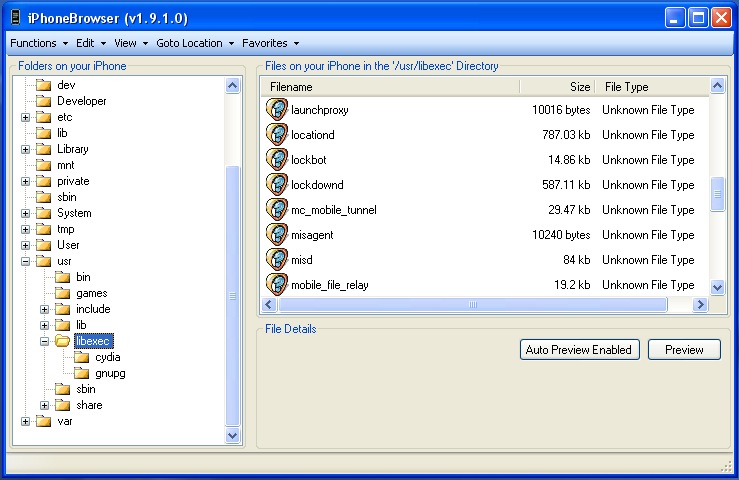
5) Drag and drop the lockdownd file downloaded at step 2 into libexec folder. (We are just replacing the lockdownd file required for hacktivation!)
6) Reboot your iPhone and wait for your iPhone to hacktivate!
7) Turn WiFi on and Launch Freeze app and install Cydia.
8) You may then follow this unlock guide to unlock your iPhone 3GS!
You should be all set to enjoy your iPhone 3GS in its full glory!
courtesy : Thanks to Lukas and iPhonejtag,blogspot.com..
I just want to let you guys know that I am very thankful that you guys provide these kinds of informations.
After installing cydia, I downloaded all the apps in my iphone 3G S the same in my iPhone 3G. But after the installations, my iPhone 3G S started crashing and going to safe mode randomly. I couldn’t do anything but to restore it. After the restoration process my iPhone 3G S was stuck in activation mode. Thanks to your info in how to hachtivate the 3G S, now I’m back in business.
To all 3G S owners, just a reminder that not all in cydias apps are working on the 3G S yet. We’re just gonna have to wait for Saurik to update his apps to be compatible with 3G S.
Thanks again guys!!!!!
Just do the same process 2 or 3 times and it will come right
Yep, that's what happened with RC2…
Sent from my iPhone
Hi!
I have an iPhone 3GS.
I jailbroke it using purplera1n.
I followed your guide and replaced the lockdownd file using PhoneVIew.
Now when it boots up it freezes with the Apple logo and the white waiting wheel on top.
The phone is no longer recognized by my Mac og PC and I can't seem to get it into recovery mode either.
Any suggestions?
Hi! You will have to restore to iPhone 3.0 via iTunes. Put it in restore mode (recovery) using this guide : http://ilikemyiphone.com/wordpress/2009/07/04/how-to-ge…
Then, jailbreak using purplera1n and replace lockdownd using iphonebrowser.
Thanks for the advice. I got it back into recovery mode and did a restore. Then i used purplera1n to jailbreak it again. Copied the lockdownd file again.
But the same thing keeps happening. It freezes at the Apple logo with the wheel on top and then reboots after libg while. This keeps happening untill I put it into recovery mode and do a restore.
Can it be that this particular lockdownd file does't work with my iPhone?
I sent you another lockdownd file. Hope it works.
You tube , is not working , any fix
Try MxTube from Cydia for now while I post a fix…
Thanks, MxTube works , …I do not have O2 sim so i have used Locdwond to activate.
I guess that YouTube issue casued by not activating by orginal sim card. witing for your fix…many thanks
hi kkiran. cheers for the guide!
one question – does it matter what service providers sim card is present in the phone with respect to the particular lockdownd file you've linked? are there different lockdownd files for different service providers?
i have an unlocked 3gs and am scared about how i will hacktivate if something happens to it..
The lockdownd file here should do the trick. You should have AT&T sim though.Sent from my iPhone
Why should I have an AT&T sim? Isnt the whole point of hacktivating because I'm trying to use my 3gs on a different service provider?
hi can you send me another lockdown please, my phone also freezes in the boot screen.
The lockdownd file on this page should work. chmod 755 it…
Sent from my iPhone
Which country are you in and who is the cellular carrier?
Sent from my iPhone
I'm in the US. and I used t-mobile. I actually used the lockdown file from my 2G unlocked/hacktivated/jailbroken iphone and I used it to replace the Iphone 3GS original, and I rebooted with T-mobile sim card the whole time. Everything seems to work at perfection, even unlocked the phone but cannot get original Youtube to work. Let me know when you get a fix I'm using MXtube for the moment.
locdownd file..http://www.slingfile.com/file/3NvN4nwnb9
Why is this file less than 300 kb?
Sent from my iPhone
it is 611 KB , after you unzip it.
which lockdownd file should I use if I want to use the 3gs in Denmark with TDC Mobil as carrier?
I have tried several lockdownd files but with no success. Every time repeats Apple logo with freezed spinball. My 3gs is from France, perhaps Orange. Does anybody have Orange lockdownd?
You should use Push Fix for YouTube get working. This fix install security certificates also needed for YouTube. To install you need to have a Cydia. You should add a repository http://cydia.iphoneil.net and try to search for Push Fix next. Good luck and thank you for comment about your current lockdownd from 2g 🙂
am using vista and itune 8.2.1…firmware 3.0
So you updated to 3.0.1 huh? Purplera1n doesn't work with 3.0.1..
Use redsn0w and jailbreak… ultrasn0w to unlock!
Sent from my iPhone
hi thanks…..the firmware is 3.0……but still no iCCID, NO Bluetooth…..no wifi…pls help
Please help me i initially use purple rain1 and my iphone 3g s work fine untill 2 days ago all hell broke loose…..Now i use the latest download Purplera1n RC2 and i have lost my WIRELESS……NETWORK…IMEI…..ICCID….cant use my phone NOW
Hi! The best I could suggest you at this time is :
1) Update to 3.0.1 using iTunes
2) Jailbreak using redsn0w
You should be all set!
tried to up upgrade but its given error 23…..any idea
Keep it in restore mode and then update to 3.0.1 using itunes….
Update your iTunes, it worked fine for me!
omg! I have changed the /usr/libexec/lockdownd by the one downloaded here, and now my iPhone 3GS is in the (pin)apple logo loop… i'm unable to access to the iPhone filesystem, because the "phoneview" or the iPhoneBrowser don't detect it, so i can't put the original file back again… And also, i'm unable to restore to any version ( 3.0 o 3.1.2, pwned or original ) neither in DFU or restore mode ( error 23 o error 1006 ).
I have tried to use the iRecovery tool, blackra1n RC2 unsuccessfully…
Please help meeeeee!!!
Thanks
When you say you cannot restore to any version – what is the error you get? Cos' any iPhpne should be able to be restored to factory stock firmware. Only 3.1.2 firmware can be restored cos' it is 3GS and firmware files need to be signed…
i get error 23… here is a log from iTunes when i try to restore with the 3.1.2 firmware original from apple:
2009-11-02 08:33:38.222 iTunes.exe[4208:13d8]: iBoot build-version = iBoot-636.66
2009-11-02 08:33:38.224 iTunes.exe[4208:13d8]: iBoot build-style = RELEASE
2009-11-02 08:33:38.224 iTunes.exe[4208:13d8]: <Recovery Mode Device 065079C2>: operation 44 progress -1
2009-11-02 08:33:38.226 iTunes.exe[4208:13d8]: radio-error = 512
2009-11-02 08:33:38.228 iTunes.exe[4208:13d8]: radio-error-string = 'Communication failure'
2009-11-02 08:33:38.228 iTunes.exe[4208:13d8]: fatal recovery mode radio error
2009-11-02 08:33:40.342 iTunes.exe[4208:f14]: iTunes: Restore error 23
I never really came across this error myself. Did you try the DFU mode or Restore mode? Strange case but I will try my best to help you out here.. Challenges are fun 🙂
i'm pretty sure that I've been trying DFU mode and Restore mode with the same results… I've been "googleing" to find a solution for the "error 23", and the most common answer is that's a hardware problem… but I think that is more a baseband corrupted problem… i waiting for the geohot's new tool to see if it helps…
Anyway, if you wanna help me, i will do any test you want…
I truly appreciate your time and effort!!!!
If you are positive about a hardware issue, Apple will be more than happy to replace it for you!
Looks like it may be a hardware issue in your computer… Why don't you give it a go at your friend's pc or a different laptop/computer?
the problem is that this iphone has the pinapple logo al boot, so Apple wouldn't take care about it…
i've tried with 3 different computers and cables… different itunes versions… no success…
i'm looking for, at least, the way to change the boot logo in dfu or recovery mode without using iTunes… any ideas?
Never encountered such an issue 🙁 I don't think we can change the boot logo without atleast SSH or root access. I would try with a Mac as a last resort or Geo's new blackra1n….