iPhone 2G, 3G, 3GS users can now safely update to 3.1.2 firmware without updating the baseband (for unlock). If you are not the one to download all the various files and just want the ultimate result, these files are waiting for you to download! If you rather want to start from scratch, download Pwnage 3.1.4 tool for Mac.
- Caution #1 : A restore is going to wipe the iPhone clean. Hence, please backup your iPhone using iTunes and then proceed.
More info about these custom firmware files :
- Has factory boot logos (Apple and restore cable),
- Only Cydia, No Icy
- Preserved Unlock baseband (that is the whole point of a custom firmware, right?!)
- Activated/Not Activated (Check the files carefully)
Prerequisite (recommended) :
If your iPhone is already jailbroken at the current firmware (3.0, 3.0.1, 3.1), it will be a hassle free upgrade! Restore mode will work just fine with already jailbroken iPhones.
p.s : I am paying for these downloads (purchased RapidShare Download traffic due to overwhelming demand). Please consider donating to keep these downloads free and instantaneous. Thank you…
- Download the following files ONLY if you have an Official iPhone contract with your cell carrier (ATT and others….)
- iPhone 3GS 3.1.2 Custom Firmware Not Activated Official Carriers Part 1
- iPhone 3GS 3.1.2 Custom Firmware Not Activated Official Carriers Part 2
OR
- Download the following files ONLY if you don’t have an iPhone contract (T-Mobile and others…)
- iPhone 3GS 3.1.2 Custom Firmware Activated for Other Carriers Part 1
- iPhone 3GS 3.1.2 Custom Firmware Activated for Other Carriers Part 2
- Download the following files ONLY if you have an Official iPhone contract with your cell carrier (ATT and others….)
- iPhone 3G 3.1.2 Custom Firmware Not Activated Official Carriers Part 1
- iPhone 3G 3.1.2 Custom Firmware Not Activated Official Carriers Part 2
OR
- Download the following files ONLY if you don’t have an iPhone contract (T-Mobile and others…)
- iPhone 3G 3.1.2 Custom Firmware Activated for Other Carriers Part 1
- iPhone 3G 3.1.2 Custom Firmware Activated for Other Carriers Part 2
- Download the following files ONLY if you have an Official iPhone contract with your cell carrier (ATT and others….)
- iPhone 2G 3.1.2 Custom Firmware Not Activated Official Carriers Part 1
- iPhone 2G 3.1.2 Custom Firmware Not Activated Official Carriers Part 2
OR
- Download the following files ONLY if you don’t have an iPhone contract (T-Mobile and others…)
- iPhone 2G 3.1.2 Custom Firmware Activated for Other Carriers Part 1
- iPhone 2G 3.1.2 Custom Firmware Activated for Other Carriers Part 2
Step 2) Join the downloaded files
- The files downloaded above have an extension .001 and .002. They need a special opensource (free) software HJSplit to join.
- Download HJSplit to join both the files – Link for Windows Computers here and Macs here.
Step 3) Restore the firmware in iTunes 9.x
- You should now have the respective firmware file with an extension .ipsw (make sure it is .ipsw or else, it will give you an invalid firmware error) . Follow the steps in order :
- 1)Launch iTunes and connect the iPhone to your Mac / Windows computer.
- 2)If your iPhone is already jailbroken (if you see Cydia on your iPhone!), put your device in Restore mode (Turn iPhone off, keep holding Home button while you plug it in to your computer). Proceed to step 7. If not jailbroken already, continue to the next step (3).
- 3)If you are aware of DFU mode, proceed further. If not, watch this quick video and pay close attention to the steps to achieve DFU mode.
- 4)Turn your iPhone off. Press and hold the Home button and the Power button at the same time for 10 seconds.
- 5)After exactly 10 seconds release the Power button. Continue holding the Home button until iTunes pops up a message saying that it has detected an iPhone in recovery mode.
- 6)The iPhone will show you a blank screen (black).
- 7)Click on ‘Ok’ to the prompt displayed.
- 8)For a Mac : Hold Option key and then hit Restore button.
- 9)For Windows : Hold the shift key and then hit the restore button.
- 10)In the dialog box that pops up, browse the downloaded custom firmware file (the .ipsw file that you downloaded and joined using hjsplit in step 1.x).
Step 4) Give it few minutes to perform the restore. Once the iPhone is up and running, proceed for software Unlock using Cydia. Follow this guide to install Ultrasn0w to software unlock your iPhone 3G/3GS. iPhone 2G is already unlocked with this custom firmware!
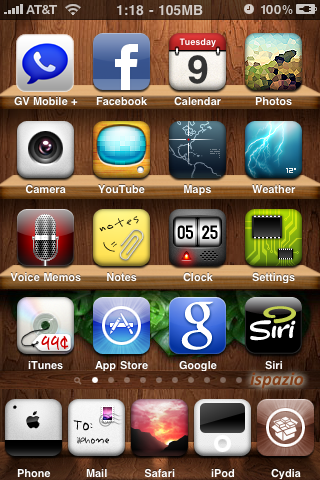
You are now good to go! Post a comment if you are stuck at any of the steps described above.
[Pwnage Tool is developed by the Dev Team. This is just a custom firmware file created using that tool especially for Windows users cos’ Pwnage tool is available only for Macs.]
thanks for the firmwares.
thanks…
Worked great for me and was able to then activate MMS on my 2g.
will this work with non activated 1.1.2 2g out of box upgraded to 3.1.2 accidently ?
Yes it will!
Hi,
I am currently on a jailbroken and unlocked 3G, OS 3.0. I wanted to upgrade to 3.1.2, and chose to got the pwnage tool route rather than Blackra1n. I downloaded your custom firmware, joined them using HJsplit, with the final file being 233 Mb in size.
But, when I put the phone in recovery mode, and did the shift+restore, it says: "the iphone 'iPhone' could not be restored because the firmware file is incompatible'. Whats that supposed to mean?! I did the procedure of joining with HJsplit correctly, and the final file is actually 233 Mbs.
Any solutions?
Also, instead of custom f/w, should I directly update to 3.1.2 stock and use Blackra1n? I am a bit apprehensive about Blackra1n ,with the wi-fi issues and all.
And I'm on a non-official carrier. (like T-mobile etc.)
What is the exact name of the file you downloaded? You get that error
when you try iPhone 2G firmware on a 3G iPhone.
Size:
part 1 : 183500 KB
part 2: 67453 KB
On my laptop, this is what the 'size' column shows in Vista:
iPhone1_2_3.1.2_7D11_Activated_Custom_Restore_iLikeMyiPhone.ipsw.001 = 173,414 kb
iPhone1_2_3.1.2_7D11_Activated_Custom_Restore_iLikeMyiPhone.ipsw.002= 65,873 kb.
But I d/l from these RS links from above:
http://rapidshare.com/files/292476311/iPhone1_2_3…
http://rapidshare.com/files/292479169/iPhone1_2_3…
Are these right?
And, what in your opinion is the best way to upgrade? A custom f/w or a stock f/w with blackra1n?
I would try to preserve the baseband at 4.26, so custom firmware. Yep,
those are the right files…
Then whats the problem mate? Also, just for info, the master ipsw after hjsplit is of 239,287 kb.
I tried restoring 5 times now, but always the same problem lol..
What should I do now?
If you are using 3G iPhone and downloaded 3.1.2 activated firmware, I
see no reason why it should say 'incompatible'… The other day I was
helping this girl who had a similar error. She was using a 3G iPhone
and used 2G firmware!
i have the iphone3g and it is unlocked and jailbroken and the wifi is NOT working i have 3.1.2 and i have reset network settings, restored and all of this other stuff, i really really need help please i have T-mobile so im not sure if thats why or not tho
no it wont find it im told that its a firm ware issue and that it can be fixed, and also now i have the data plan for t-mobile and i do not know how to get it to work
Well, I suspect it is a firmware issue. You can try downgrading to 3.0 and give it a go..
but wouldnt that lock my phone back up? and if it dosent would you be willing to help me with it?
Yeah I will help you through it, not to worry…
ok, i am going to take a shower lol but if you will email me at joshrsmoliak@gmail.com that way we can talk
ok well what should i do first then
Put your iPhone in DFU mode and restore to stock 3.0 firmware in iTunes…
will i beable to unlock it again?
Yes sir..! 3.0 has older baseband…
im not sure what that means lol but ok what do i do when its restored btw im on a PC
You will get an error message most likely. Let me know the error message. then you have to activate it using ultrasn0w tool available in downloads section…
where do i find the 3.0 at?
Downloads section…
it gave me a error when i tried to download
Download or downgrade? What file did you download?
the download from rapidshare said that it had a error it wouldnt let me download it wanted me to pay
will i beable to ge tthat for PC
Yes sir, please take a look at the downloads section…
ok im downloading it now and then i will restore with that and then what do i do
Then use quickpwn and jailbreak it and check WiFi.
wont it have to be unlocked first?
No.. Jailbreak first and only then an unlock….
ok i am restoring now and when its down then i go get quickpwn and jailbreak it right?
Yep, exactly!
Sent from my iPhone
i am haveing trouble finding quickpwn for windows
and it said error 1015 im not sure what that means or anything tho
will i beable to get that for pc?
oh ok lol it said it didnt restore so i was confused
and did you mean redsnow?
Yeah redsn0w for Windows.. Quickpwn for Mac
ok im DL it now what will i do after its jailbroken?
Check for WiFi..
heres the issue i got on quickpwn and tried to do exactly what it says and it comes up saying the ipsw file you selected does not match any firmware version quickpwn supports and then it goes on saying the file may bo corrupted
ok ill try that
ok wifi is not fixed
iv tried alot now lol
thQ so much u r the best
Hi
I Need help, i am trying to search for the jailbroken iPhone 3GS custom firmware "3.1.2" baseband "05.11.07" done by pwnagetool 3.14 but i cant seem to find it.
– Cydia / Un-activated /Standard Boot logo.
Please help
thanks heaps.
Use blackra1n or the firmware here… It is the same for 5.11 baseband…
Hi,I need some help here
Info:iphone 3g,window 7, 32 bit contract with AT&T,I successfully install 3G 3.1.2 Custom Firmware Not Activated Official Carriers,cydia works wifi too.
But phone waiting for activation,showing only one bar,if you try to make a call ,call fail.I don't know what to do.Please Help.Thanks
What is the carrier?
Modem firmware in settings – general -> ?
the carrier is at&t the firmware are,i thing some like 47..,sorry i do not have the phone with me thanks
the phone was working before the update to 3.1.2
Hi, I hope someone can help me.
My iphone is 3G fw 2.2.1 and would like to upgrade to the latest fw 3.1.2. I've downloaded the custom fw for iphone 3g jbreak with no contract, and have joined the files. But when I tried to do a restore, there is no popup message coming from my itunes where I should click 'OK' (step 7). And now my iphone stuck in recovery mode loop.
Any help is much appreciated. Thanks.
2G activated one didn't work on my iPhone. I did apply Apple's 31.2 before trying the custom one is that's the reason I am getting restore error with code 1600. Let me know if there is a way around.. right now my phone is locked and only displaying emergency call option…
IPhone type is 2G and OS is XP