
Software Unlock your iPhone 3G 3.0 using Ultrasn0w – Quick and Easy! [Screenshots incl.]
23 June 2009
14,841 views
95 Comments
The Dev Team did it yet again! The cat and mouse game is on! All iPhone 3G owners (no matter what firmware you have) can now unlock their devices!
Lets get started with a step by step guide (It will be a short one this time around!)
1) Update your iPhone 3G to 3.0 . You have two options here :
- redsn0w (DIY Quick!)
- Pwnage Tool (Download the Custom Firmware 3.0 if you want to Jailbreak directly without messing with other tools)
2) Now that you performed the Jailbreak steps necessary in Step 1, all you have to do is pop in your SIM card(be it T-Mobile or any other GSM carrier).
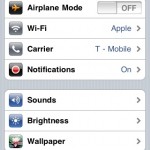
- Turn WiFi ‘On’ on your iPhone 3G and connect to a Wireless Access point (WiFi). (Create an AdHoc WiFi Access point if there is no WiFi access)
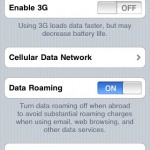
- Disable 3G on your iPhone if you are on an unsupported frequency (T-Mobile). Other carriers, try disabling and then enable once unlocked!

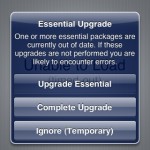
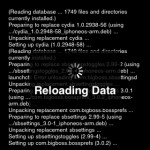
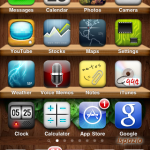
- Launch Cydia on your iPhone 3G and download the necessary upgrades if prompted and hit ‘Restart Springboard’ when done.


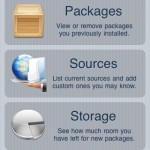
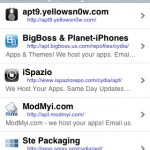
- Tap on ‘Manage’ at the bottom and choose ‘Sources’. Now hit the Edit button at the top right corner and now hit the Add button.

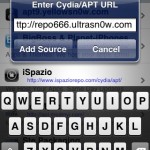
- Enter repo666.ultrasn0w.com when prompted with ‘Enter Cydia/APT URL’ dialog and hit the ‘Add Source’ button.

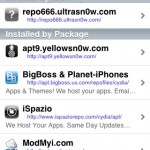
- Once it refreshes, return to Cydia and hit the ‘Done’ button and tap the top most entry shown.
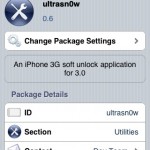
- Now tap Ultrasn0w -> choose the install button and Confirm. Now return to the main menu in Cydia.


- Restart your iPhone and boom, you should see your carrier signal!





[...] unlocks iPhone 2Gs. iPhone 3G needs manual software unlock software found in Cydia. Follow this guide for step by step instructions to install Ultrasn0w Software Unlock. iPod Touch doesn’t need unlock step since it was never [...]
[...] iPhone 3G. You may also proceed if you signed an official iPhone contract and need jalbreak stuff! Ultrasn0w is now [...]
Pretty nice post. I just stumbled upon your blog and wanted to say
that I’ve really enjoyed browsing your posts. Any way
I’ll be subscribing to your blog and I hope you write again soon!
Thank u Kiran. U rock!
im currently using a jailbroken 2.1
will the above method allow me to update to 3.0, jailbroken, without deleting my smses?
im using iphone 3G and Vista. thanks! (:
You have to backup all your data via iTunes first. This restore is going to wipe the data clean…
Sent from my iPhone
i just used another set of iphone to update to 3.0, and all my information were intact. but i cannot figure how to jailbreak this iphone. this one hasnt been jailbroken before btw.
Update is different from restore.
Just follow the custom firmware guide step by step and you should be all set. Backup your data though…
Sent from my iPhone
i dont exactly get you i am sorry, right now i am trying to jailbreak a phone that hasnt been jailbroken before and it has been updated to 3.0 already.
yet, i cannot seem to use redsn0w to jailbreak because i cannot browse the ipsw for my current firmware, i cant find the update i downloaded from itunes.
You shouls enable 'view hidden files' and then follow the path mentioned in that guide to get to that ipsw file…
okay, i got it done. somehowww all my data were intact. (: thanks alot.
now im trying it on the iphone that was jailbroken. (: wish me luck
Good luck! Hope it worked for you!
hey, i just did it and its working perfectly fine.
but i have no idea how do i download applications online to put into my iphone, for example from http://appulo.us/appdb/
do you have any guides how to do it?
if its OpenSSH, i cant seem to get it to work. i have no idea why, maybe your guide may be more useful to me.
hi. my iphone 3g has firmware 2.30 ,OS 2.2.1 with bootloader 6.02 (XP). Do the steps above apply to my phone? Currently i cannot use my phone, it cant detect the sim card, even it has turbo sim.
Firstly throw the turbo sim away. Perform the steps in order and you should be able to unlock it…
Sent from my iPhone
you cant help me with this?
Hi! I don't support installous or pirated apps on my site. It hurts the developers a lot. You can alway google it. You need to add a new source in Cydia : "cydia.installo.us" … That is the best I can help with!
alrite, im sorry about that. anybody who can help me with that pls contact me @ lazer_boyz@hotmail.com. thanks (:
hi. i've followed the steps above. My iphone still cant detech the sim card. By the way, Im using it here in the Philippines using a local sim. What should i do?
Hi. Ive followed the steps. My iphone still cannot detect the sim card. Im using a local sim here in the Phiippines. Also, I notice the pictures inside the camera roll are blank. I have a problem with the photos and vidoes , i cannot delete them. (this problem already existed even before i did the steps above.) Wonder if it affected the ultrasn0w. What should i do?
Best bet : Restore to official firmware 3.0 via iTunes. Now try jailbreaking it afresh. ultrasn0w should work great!
already did it twice. restored firmware 3.0 via iTunes. Then ran the steps above. Still didnt work. what may be the problem? I have talked to the iphone community here in the Philippines, ultrasn0w worked fine for them.
I already removed the turbo sim, btw.
Did you manually perform the jailbreak using redsn0w?
is it possible my iphone has sim solution installed inside my hardware? dats y ultrasn0w wont work? how can i check it?
yes. i performed the exact steps mentioned above. jailbreak using redsn0w then ultrasn0w to unlock.
No, sim solution cannot be installed on your phone. Please tell me the operating system of your computer, firmware you are on right now and the baseband version.
Sent from my iPhone
version 3.0 (7A341) firmware 04.26.08. i dont know my bootloader now. Before i upgrade to 3.0, my bootloader was 6.02
hi. have you figure out what's wrong with my iphone? thanks for your help
Did you try my last suggestion?
Sent from my iPhone
yes. i used redsn0w to jailbreak then ultrasn0w to unlock.
Iphone 3g FW: 3.0 Windows Vista home edition 32-bit
This did nothing for me, I went by way of custom firmware and installed ultrasn0w and it still says no service. Is it because I am trying to use an at&t sim card?? if I were to put a t-mobile sim card in would it work??
Thanks much
Ultrasn0w will still work with ATT. I would suggest you uninstall ultrasn0w and then check for signal.
Tmobile works just fine with ultrasn0w…
Sent from my iPhone
[...] You should now see Cydia on your iPhone 3GS! Follow this quick screenshot tour of Ultrasn0w to unlock your iPhone 3GS! [...]
I was trying to activate my iphone 3g 3.0 for sooo long! So many unsuccefull ways to do it! Finally did it!!
Thank you so much!
Yay! Congratulations!
Sent from my iPhone
[...] You may then follow this unlock guide to unlock your iPhone 3GS! [...]
[...] You may then follow this unlock guide to unlock your iPhone 3GS! [...]
I did this on Vista and it worked 1st time!!!!
Congratulations!Many things failed when I tried them first time when it comes to hacking them and posting results here! You are lucky!
superb and simple instruction, even a technophobe like me managed to unlock and activate my phone without the help from my 9yr old daughter,she's obsolete now lol, but now i have a bigger problem ,the phones IMEI number must be blocked as i cant use the phone to ring out or in….any of you lovely folk got a way out of it
I didn't understand the problem. How do you know the IMEI is blocked? I have never heard of such thing on an iPhone. Do you see no service or do you see a signal?
i have a full signal bar and service provider logo im just guessing its IMEI is blocked as that is what happens with cell phones
kkiran i have a full signalbar and my service provider (T-Mobile) logo is in the in the corner and im just guessing it must be the IMEI thats blocked, as i found the phone and didnt buy it
Hi Kiran , I have 3g iPhone 8gb . Os3.0 . I jail break with redsnow after that I can’t find the wifi and camera . So that I can’t download ultrasnow . I used frmwr downloaded from iclarified site which they sead frmwr for iPhone 3g os 3 . I don’t konw I did any wrong with this . I did like I upgrade through iTunes 8.2.1 then I open redsnow and brows and select the downloaded frmwr and I folow the redsnow snow that finished fine .after that I sec with iTunes . Only one time wifi show wifi and seddonly discont . Then no more wifi . Then I don’t know what I have to do . Pls if u can help mail me to shaahi@live.com
i have iphone 3g s 3.0 firmware>>>>>computer running windows vista>>>>>>my iphone was jailbreak using purplera1n and was working well untill 2days ago stopped>>>>>>i download another purplera1 and after the installation my phone has no ICCID>>>>>>>>no firmware>>>>>>no bluetooh etc the phone is useless now please I need help please attached is the log
How can I get my >>>ICCID>>firmware>> bluetooh>>wifi >>Network>>>back
INFO: welcome to purplera1n for windows
INFO: loaded dll at C:Program FilesCommon FilesAppleMobile Device SupportbiniTunesMobileDevice.dll
INFO: button clicked
INFO: callbacks registered
INFO: internal recovery callback called
INFO: unregistered normal mode callback
INFO: go go gadget ra1n
INFO: said hi
INFO: sent exp1
INFO: uploading payload
INFO: usb file is \?USB#VID_05AC&PID_1281#CPID:8920_CPRV:14_CPFM:03_SCEP:02_BDID:00_ECID:0000030B4A051D4F_IBFL:01_SRNM:[879240BL3NR]#{ED82A167-D61A-4AF6-9AB6-11E52236C576}IB0000
INFO: running the geohot command
INFO: I JUST DROPPED IT LIKE ITS HOT
WARN: wtf who called this?
INFO: global callback finished
***
INFO: welcome to purplera1n for windows
INFO: loaded dll at C:Program FilesCommon FilesAppleMobile Device SupportbiniTunesMobileDevice.dll
INFO: button clicked
INFO: internal recovery callback called
INFO: unregistered normal mode callback
INFO: go go gadget ra1n
INFO: said hi
INFO: sent exp1
INFO: uploading payload
INFO: usb file is \?USB#VID_05AC&PID_1281#CPID:8920_CPRV:14_CPFM:03_SCEP:02_BDID:00_ECID:0000030B4A051D4F_IBFL:01_SRNM:[879240BL3NR]#{ED82A167-D61A-4AF6-9AB6-11E52236C576}IB0000
INFO: running the geohot command
INFO: I JUST DROPPED IT LIKE ITS HOT
WARN: wtf who called this?
INFO: global callback finished
INFO: callbacks registered
INFO: unused callback called
***
INFO: welcome to purplera1n for windows
INFO: loaded dll at C:Program FilesCommon FilesAppleMobile Device SupportbiniTunesMobileDevice.dll
INFO: button clicked
INFO: callbacks registered
INFO: internal recovery callback called
INFO: unregistered normal mode callback
INFO: go go gadget ra1n
INFO: said hi
INFO: sent exp1
INFO: uploading payload
INFO: usb file is \?USB#VID_05AC&PID_1281#CPID:8920_CPRV:14_CPFM:03_SCEP:02_BDID:00_ECID:0000030B4A051D4F_IBFL:01_SRNM:[879240BL3NR]#{ED82A167-D61A-4AF6-9AB6-11E52236C576}IB0000
INFO: running the geohot command
INFO: I JUST DROPPED IT LIKE ITS HOT
WARN: wtf who called this?
INFO: global callback finished
INFO: unused callback called
INFO: internal recovery callback called
INFO: unregistered normal mode callback
INFO: go go gadget ra1n
INFO: said hi
INFO: sent exp1
INFO: uploading payload
INFO: usb file is \?USB#VID_05AC&PID_1281#CPID:8920_CPRV:14_CPFM:03_SCEP:02_BDID:00_ECID:0000030B4A051D4F_IBFL:01_SRNM:[879240BL3NR]#{ED82A167-D61A-4AF6-9AB6-11E52236C576}IB0000
absolutely brilliant!!
than u it works like a charm!!!
I am glad! Mission accomplished!! Enjoy your iPhone
[...] Step 4) Give it few minutes to perform the restore. Once the iPhone is up and running, proceed for software Unlock using Cydia. Follow this guide to install Ultrasn0w to software unlock y… [...]
after i unlocked my iphone 3g os 3.0 using ultrasn0w i couldn't get any signal i need help can somebody help me please email me if you can khatatbih@aol.com
What is the baseband firmware version in settings -> general -> about ?
[...] 4) Give it few minutes to perform the restore. Once the iPhone is up and running, proceed for software Unlock using Cydia. Follow this guide to install Ultrasn0w to software unlock y… iPhone 2G is already unlocked with this custom [...]
OK so everything works but i no see Carrier NAME. signal bars OK phone works so no wories. but… no carrier name on homescreen.
That is a known issue for 3.1 firmware. Try ignoring it!
yo great man,
I hv iPhone 3g v3.1[7C144] modemFW05.11.07 bootloader05.09[G2M3S2]
Do these procedures work on mine????????
You can jailbreak but not unlock unfortunately. Try 3.1 instead of 3.0. Look for newer post (3.1) on this site.
Hi!! thanks for the help, i was able to jailbreak my iphone 3G 3.1 using you tutorial and it worked!!!
my hope was to unlock it too, so i used used ultrasn0w via cydia, the new Tmobile sim seems to work but the WIFI wont work..
[...] 4) Give it few minutes to perform the restore. Once the iPhone is up and running, proceed for software Unlock using Cydia. Follow this guide to install Ultrasn0w to software unlock y… iPhone 2G is already unlocked with this custom [...]
I am currently using iphone 3gs 3.1.2
and i have tried this method several times but it isnt working , all it does is keep searching for a long long time, afterwards it says "no signal"
PLEASE HELP
What is the baseband version (settings -> General -> About)?
Did you turn 3G off, did you also reboot your iPhone?
ok, it so good and u so pretty
Pretty?! I am a guy!
I am using iPhone 3GS 3.1.2 and I just unlocked the phone using this method. I don't see any carrier signal. It just says searching…
Here are some details that might help.
Version 3.1.2(7D11)
Modem FW 05.11.07
Model MC131B
Please help
Can you please tell me how can I get the phone working? Should I go back to 3.0 or something?
I did not understand what you mean by follow the links for 3.1.2 firmware. Can you please post some helpful links? Thanks a lot in advance
http://www.ilikemyiphone.com/2009/10/13/download-…
Hi Guys!! thank you so much for this post. I did the jailbrake using the not activated firmaware for an iphone 3gs. It worked just fine, but now i dont have 3g signal and it doesnt show the carrier name on the left upper corner. I can make calls, but thats it ¿Am I missing something? I already did the unlonck with ultrasn0w but it remains the same… I could use some tips…. Thx
Use 'Make it mine' from Cydia for the carrier. It is a known bug!
I got a new iPhone 3GS with 3.1.2 firmware already on it. I haev been trying to unlock the same and used the exact procedure listed above but am unable to unlock the phone. There is no error at any step but the phone is not able to connect to my carrier when i put my SIM – it keeps saying "Searching…". Please help!
hi i use version 3.1.2(7D11) modem firmware 05.11.07 this iphone is lock with optus i need free software for unlock
thank
I have a 2g iphone with os 3.1.2, modem software 04.05.04_g. This phone has been jailbroken and unlocked. Cydia is installed. Ultrasn0w is installed. But whenever I put my go phone sim chip in it says that a different sim detected and to connect to itunes… I have tried jailbreaking with redsnow 2 times now and still get the same problem. It worked before the upgrade to 3.1.2 but now can't get it to activate no matter what. If there is no sim installed it works great as an ipod touch, but really miss using it as my primary phone. So how do I hactivate it gophone sim chip?
Hi, I upgraded my iphone 3G to 3.1.2 using your custom fw
(http://www.ilikemyiphone.com/2009/10/13/download-…
but I still can't unlock it with cydia following your above procedure. I've create adhoc wifi with my laptop and my iphone detected the wifi connection. but it couldn't connect to internet, both by browsing safari and cydia.
can u help me? my baseband is 02.30.03
Thanks for your reply. can u describe the step by step process of doing this and where to get Apple's official 3.0 firmware?
Look for official firmware links in downloads section…
Downloaded apple's official fw 3.0, then what should I do next? Can I just restore my iPhone using iTunes shift+restore with this fw 3.0? Thanks
Yes sir! Use shift restore…
Sorry, do I have to set my iPhone to recovery or DFU mode before restoring or just normal mode?
Done restoring to 3.0 n jailbreaking it. tomorrow will restore it to 3.1.2 will update it here. Thanks
Good job! Let me know if you need any more help!
restored and unlocked to 3.1.2. thanks guys for the help!
Not a problem
You have fun now!
[...] 4) Give it few minutes to perform the restore. Once the iPhone is up and running, proceed for software Unlock using Cydia. Follow this guide to install Ultrasn0w (for 4.26.08 baseban… If you have 5.11.07 baseband, blacksn0w should be used for [...]
Hi,
I just follow the instruction and install the 3.1.2 firmware. It restart fine and I went ahead and installed the Ultrasn0w and follow the instruction. Now the phone shows "No Service" and I can't make any call. I noticed that my Version is been upgraded to 3.1.2 (7D11) but my Modem Firmware remains 02.28.00. Can anyone help me to resolve this problem?
Thanks
i had restored my iphone 3G firmware 3.1.2 and i installed ultrasn0w but it tells searching….
and when i go to carrier it says unable to load network list
please help me out from this
my sim card is not detected after the restore
have windows XP
im from india
The baseband needs to be updated to 4.26 for ultrasn0w to work. Search for fuzzyband in Cydia to update baseband to 4.26.. It should work..
What is the modem firmware version (baseband) found in settings? Is it 4.26.08 or 5.11.07?
I can't be thankful enough… you're awesome.
-iPhone 3GS 16GB / Windows 7 Ultimate
Welcome!
i u dont get any siugnal.. try to add source http://cydia.pushfix.info
[...] Give it few minutes to perform the restore. Once the iPhone is up and running, proceed for software Unlock using Cydia. Follow this guide to install Ultrasn0w (for 4.26.08 baseb… [...]
[...] Give it few minutes to perform the restore. Once the iPhone is up and running, proceed for software Unlock using Cydia. Follow this guide to install Ultrasn0w (for 4.26.08 baseb… [...]
I have used ultrasn0w verson1.2 to unlock my 3G, v4.1. And my firmware version is 5.14. Somehow it still says "no service." I am in China. Help!
Hey there just wanted to give you a brief heads up and let you know a few of the pictures aren’t loading correctly. I’m not sure why but I think its a linking issue. I’ve tried it in two different web browsers and both show the same outcome.
AMAZING! Thank you so much, I've been trying for days to fix my iPhone!!!!
At first, a bunch of windows popped up on the screen, but just kept pressing "okay" and then, the signal started to read "searching" and voila!
Leave your response!
Categories
Recent Posts
Recent Comments
Popular Tags
Blogroll
Meta
Recently Posted
Most Viewed
Most Discussed