iPhone 2G, 3G, 3GS users can now safely update to 3.1.2 firmware without updating the baseband (for unlock). If you are not the one to download all the various files and just want the ultimate result, these files are waiting for you to download! If you rather want to start from scratch, download Pwnage 3.1.4 tool for Mac.
- Caution #1 : A restore is going to wipe the iPhone clean. Hence, please backup your iPhone using iTunes and then proceed.
More info about these custom firmware files :
- Has factory boot logos (Apple and restore cable),
- Only Cydia, No Icy
- Preserved Unlock baseband (that is the whole point of a custom firmware, right?!)
- Activated/Not Activated (Check the files carefully)
Prerequisite (recommended) :
If your iPhone is already jailbroken at the current firmware (3.0, 3.0.1, 3.1), it will be a hassle free upgrade! Restore mode will work just fine with already jailbroken iPhones.
p.s : I am paying for these downloads (purchased RapidShare Download traffic due to overwhelming demand). Please consider donating to keep these downloads free and instantaneous. Thank you…
- Download the following files ONLY if you have an Official iPhone contract with your cell carrier (ATT and others….)
- iPhone 3GS 3.1.2 Custom Firmware Not Activated Official Carriers Part 1
- iPhone 3GS 3.1.2 Custom Firmware Not Activated Official Carriers Part 2
OR
- Download the following files ONLY if you don’t have an iPhone contract (T-Mobile and others…)
- iPhone 3GS 3.1.2 Custom Firmware Activated for Other Carriers Part 1
- iPhone 3GS 3.1.2 Custom Firmware Activated for Other Carriers Part 2
- Download the following files ONLY if you have an Official iPhone contract with your cell carrier (ATT and others….)
- iPhone 3G 3.1.2 Custom Firmware Not Activated Official Carriers Part 1
- iPhone 3G 3.1.2 Custom Firmware Not Activated Official Carriers Part 2
OR
- Download the following files ONLY if you don’t have an iPhone contract (T-Mobile and others…)
- iPhone 3G 3.1.2 Custom Firmware Activated for Other Carriers Part 1
- iPhone 3G 3.1.2 Custom Firmware Activated for Other Carriers Part 2
- Download the following files ONLY if you have an Official iPhone contract with your cell carrier (ATT and others….)
- iPhone 2G 3.1.2 Custom Firmware Not Activated Official Carriers Part 1
- iPhone 2G 3.1.2 Custom Firmware Not Activated Official Carriers Part 2
OR
- Download the following files ONLY if you don’t have an iPhone contract (T-Mobile and others…)
- iPhone 2G 3.1.2 Custom Firmware Activated for Other Carriers Part 1
- iPhone 2G 3.1.2 Custom Firmware Activated for Other Carriers Part 2
Step 2) Join the downloaded files
- The files downloaded above have an extension .001 and .002. They need a special opensource (free) software HJSplit to join.
- Download HJSplit to join both the files – Link for Windows Computers here and Macs here.
Step 3) Restore the firmware in iTunes 9.x
- You should now have the respective firmware file with an extension .ipsw (make sure it is .ipsw or else, it will give you an invalid firmware error) . Follow the steps in order :
- 1)Launch iTunes and connect the iPhone to your Mac / Windows computer.
- 2)If your iPhone is already jailbroken (if you see Cydia on your iPhone!), put your device in Restore mode (Turn iPhone off, keep holding Home button while you plug it in to your computer). Proceed to step 7. If not jailbroken already, continue to the next step (3).
- 3)If you are aware of DFU mode, proceed further. If not, watch this quick video and pay close attention to the steps to achieve DFU mode.
- 4)Turn your iPhone off. Press and hold the Home button and the Power button at the same time for 10 seconds.
- 5)After exactly 10 seconds release the Power button. Continue holding the Home button until iTunes pops up a message saying that it has detected an iPhone in recovery mode.
- 6)The iPhone will show you a blank screen (black).
- 7)Click on ‘Ok’ to the prompt displayed.
- 8)For a Mac : Hold Option key and then hit Restore button.
- 9)For Windows : Hold the shift key and then hit the restore button.
- 10)In the dialog box that pops up, browse the downloaded custom firmware file (the .ipsw file that you downloaded and joined using hjsplit in step 1.x).
Step 4) Give it few minutes to perform the restore. Once the iPhone is up and running, proceed for software Unlock using Cydia. Follow this guide to install Ultrasn0w to software unlock your iPhone 3G/3GS. iPhone 2G is already unlocked with this custom firmware!
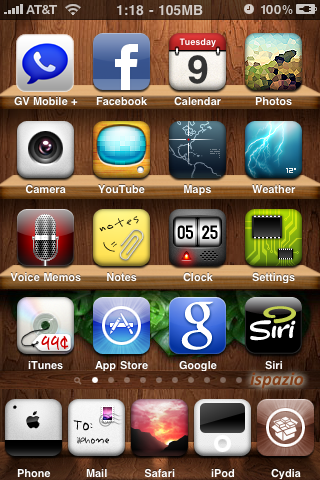
You are now good to go! Post a comment if you are stuck at any of the steps described above.
[Pwnage Tool is developed by the Dev Team. This is just a custom firmware file created using that tool especially for Windows users cos’ Pwnage tool is available only for Macs.]
my iphone was at firmware 3.0.1 jailbroken. I could not upgrade it to custom firmware 3.1/3.1.2 using DFU mode or Recovery mode. Then I reinstalled 3.0.1 without jailbreak. Still no succes upgrading it, will give me error 1600 or 13.
What can I do?
Charm 🙂
iPhone 3G pwned ….. Thanks !!
Welcome!
I would like to thank you for the custom firmware for the phone 2G version 3.1.2 you provided.In less than 5 minutes i upgrade my os from 3.0 to 3.1.2
Hey, Can someone please make a custom .ipsw for 3gs Non-Activated 3.1.2 Baseband 5.11.07.
It worked great with my iphone 3GS:) I solved the no logo problem with 'make it mine application' as iLikeMyiPhone said in his one of the previous comments. It is easy to download and install, you gotta run cydia and get in the sections part.
After that you should choose utilities and there you go, it is there:)
Thank you all guys for perfect leading comments and of course, I wanna thank to iLikeMyiPhone especially:)
excellent job buddy:) keep it comin:)
I am so glad everything worked for you 🙂 Enjoy your iPhone now 😉
thnaks ilikemyiphone.works perfect on my iphone 3g white 16gb just updated from 3.1 custom firmware to 3.1.2 and then installed ultrasnow repo666.ultrasn0w.com via cydia and works fine with tmobile and just installed MIM(make it mine) via cydia to make the tmobile logo….so far all good..my iphone life relies on u…is there a way you can create a custom firmware for iphone 3g activated for tmobile with PINEAPPLE LOGO..i really love that…please if u can thanks..GOD BLESS U
Hmmm, that is too much work (ipsw with pineapple logo) and some users are already confused with different firmware files… Glad everything worked for you!
PLEASE IF U CAN…I WOULD REALLY APPRECIATE IT…
also do u know when they will be coming out with unlock of baseband 05.11
also when i text it wont let me use the caps lock like it wont turn into blue color to use the caps lock for the whole text…did u come across this problem
You have to enable it in Settings (keyboard)…
ok thnx bro..u da best..ur the favs on my firefox…lol..so i dont update my fone until u come out with something something like custom restore..lol..i hope ur next restore would be with pineapple logo..good luck with that..
also do u know when they will be coming out with unlock of baseband 05.11
the link say nothing found
http://ilikemyiphone.com/wordpress/2009/09/18/solution-…
http://ilikemyiphone.com/wordpress/2009/09/18/solution-…
THANK YOU! Works great with my iPhone 3GS! 🙂
Thanks ilikemyiphone. The custom firmware works great!
How do I donate? You helped me so much I can at least do a little something.
I am glad it worked for you! I accept donations only if you are working and not a student!
http://ilikemyiphone.com/wordpress/imp-downloads/tech-s…
Thanks buddy!
You are welcome! Rock your iPhone 🙂
I tried us the official att downloand and it will not combine. Had to use the non-official one which worked!! THANKS!
umm Rapid share says my download will open in 40 days….. can someone please post the 3GS with AT&T on another file sharing place? Thank you
Use a proxy and download the file.
I have a Premium Account and it still will not work. What Proxy do you suggest?
Premium account? You might have maxed out your bandwidth…
I was using the free account and it said like 2 days. So I just now purchases a premium account. This is the first file I have tried to download with the account. I logged in and now it says 18 days left. I can download through sendspace or mega upload very fast. I dont know how else to get these files…
If you purchase it and it is not letting you download, please contact rapidshare by phone and let them reset the limits.
Yes I purchased it. Last night I needed the 3G files for my phone and I had a friend upload them to sendspace for me so I could get them. Today I was helping my room mate with his phone and that is when I decided to purchase the account. Now I have to call overseas to talk with someone and let them know I have a premium account that I bought from them. Rapidshare is frustrating…. and not cheap.
It worked for me everytime though. I can setup an account for you if you want. It will be about $7 paypal for a 30 day account.
What about the download limits and bandwidth left?
I have an account through pay pal I just paid for one. It was 6 something euros for 30 days..
Dear customer,
Thank you for your purchase. Your Premium account has been activated and you can now download data easily and without waiting. Please ensure that your browser accepts cookies.
==============================
Login: *********
Password: **********
==============================
Ok logged in through firefox instead of Google Chrome and the first time it says time unknown. I didnt stop the transfer just restarted another one and it took off…for now. we will see